Instagram Last Active Checker: What You Can Actually See
How to check when someone was last active on Instagram: how the green dot works, why no tool shows last-seen for accounts that hide it, and what you can see.
By Steven Duncan, founder of IGDetectiveHow IGDetective checks what it publishes
There is no Instagram last active checker that works for any account you want, and understanding why will save you from a category of tools that cannot deliver what they advertise. Instagram's last-seen information ("Active now," "Active 2h ago") exists only inside its Activity Status feature, which is shown to a limited set of people under strict conditions and is never exposed publicly. This guide covers exactly when you can see someone's last-active status natively, why third-party "last seen trackers" are structurally unable to work, and what activity you can legitimately observe instead.
Full disclosure: IGDetective is our product and competes in the Instagram-tracking category. It cannot show last-active status either; where this guide mentions it, that is a first-party recommendation.
Correction, August 24, 2026: an earlier version described the connection rule in one direction only ("they follow you") in the step-by-step and failure examples; Instagram's help pages support a follow in either direction or a shared DM thread, and every mention now says so. Links to those help pages were added.
Key facts about Instagram's last-active status
- Activity Status (the green dot and "Active Xh ago" text) is only visible in limited contexts, primarily your Direct messages inbox and shared content surfaces, and only for accounts that meet the conditions below.
- You can only see the status of accounts you're connected to: people you follow, people who follow you, or anyone you share a DM thread with, and only when they have Activity Status enabled. (Instagram's own help pages, See who's active on Instagram and Turn your Activity Status on or off, describe the follow direction inconsistently; the DM thread is the most reliable surface.)
- The feature is reciprocal: if you turn your own Activity Status off, you cannot see anyone else's. Instagram enforces this trade in both directions.
- Instagram exposes no last-seen data publicly. There is no page, screen, or setting that reveals when an arbitrary public account was last online, to anyone.
- No third-party tool can read presence data Instagram doesn't expose. A site claiming to show "last seen" for any username is fabricating the result.
When you CAN see someone's last active time
The native route works only when every one of these conditions is true: the two of you are connected (you follow them, they follow you, or you share an existing Direct message thread), they have Activity Status switched on in their settings, and you have Activity Status switched on yourself. When all three hold, you'll see the green dot or an "Active today" / "Active 3h ago" label next to their name in your DM inbox. That's the entire legitimate surface area. If any condition fails (you're not connected in either direction or by DM, either of you disabled the setting), Instagram shows nothing, and there is no workaround inside or outside the app.
Why "last seen checker" tools can't work
Tools that promise to check anyone's last-active time run into a wall that no amount of engineering can climb: Instagram doesn't publish presence data. Public profile pages contain posts, bio, follower counts, but no online status. The status you see in your own DM inbox is computed for your authenticated session based on your relationship with that person. A third-party website has neither your session nor theirs, so any "last seen" timestamp it displays for a random username is invented. This is the same category rule we apply to private-account viewers in our anonymous Instagram viewers review: when a tool claims access to data Instagram structurally doesn't expose, the tool is the product being sold, not the data. Presence is not the only thing Instagram keeps to itself: it never attributes a profile visit to anyone either, which is the subject of Does Instagram have profile views?.
What you CAN see: activity, not presence
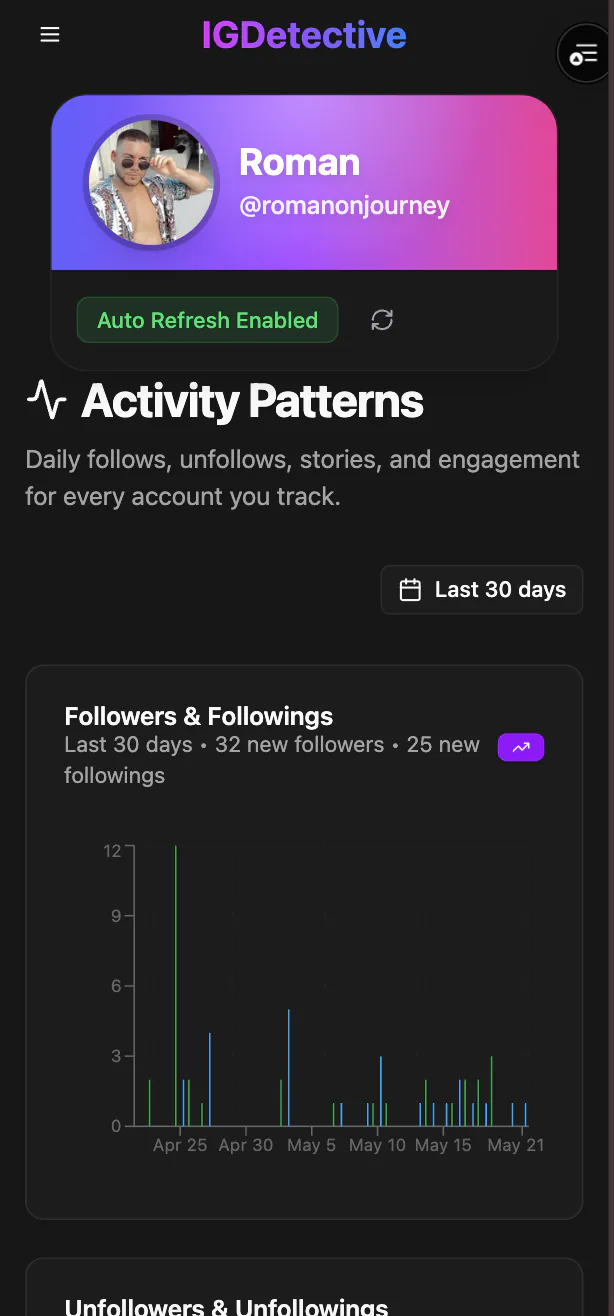
Here's the honest substitute, and for most reasons people search "last active checker," it's actually more useful. While presence (is the app open right now?) is hidden, public activity is observable: when an account posts, when it adds Stories, who it recently followed, and which posts it likes and comments on. That activity footprint answers the underlying question ("is this person actively using Instagram, and what are they doing on it?") with real public activity instead of a fabricated green dot. On IGDetective, tracking a public account shows its recent follows and recent followers, dated by day, along with engagement patterns over time (the free check on the Instagram follower viewer shows what IGDetective can reveal for an account): a quiet account and an active-daily account look completely different in their follow and interaction history, no presence data required. To read those signals well, see our guide to interpreting Instagram activity.
How to check the green dot, step by step
- Open Instagram and go to your Direct messages inbox.
- Find the person in your message threads (or start typing their name in search within Direct).
- If you're connected (a follow in either direction or a shared DM thread) and both of you have Activity Status on, you'll see a green dot or "Active Xh ago" under their name.
- Seeing nothing? One of the conditions failed: most commonly, they've turned Activity Status off, or you have. Check yours under Settings → Messages and story replies → Show activity status.
Frequently Asked Questions
Is there a free Instagram last active checker?
Not a real one. Instagram does not expose last-seen data publicly for any account, so no website or app, free or paid, can check when an arbitrary user was last online. Sites advertising this are displaying fabricated results. The only legitimate view is Instagram's own Activity Status, visible in your DM inbox for accounts you’re connected with (a follow in either direction or a DM thread), when both sides have the feature enabled.
Why can’t I see the green dot for someone anymore?
One of three conditions stopped being true: they disabled Activity Status, you disabled it (the feature is reciprocal, so turning yours off hides everyone else’s from you), or your relationship changed (the status only shows for accounts you’re connected with, meaning a follow in either direction or a shared DM thread). Instagram never shows the green dot on public profile pages.
Can you see when someone was last active if their account is private?
Privacy of the account and Activity Status are separate systems, but the answer is still no unless the DM-inbox conditions are met: you’re connected (a follow in either direction or a DM thread), and both of you have Activity Status on. A private account you don’t follow shows you nothing at all: not posts, not status.
Can someone tell I checked their last active status?
No. Looking at your DM inbox, where Activity Status appears, sends no notification. The reciprocity rule is the only cost: to see others’ status you must broadcast your own.
Does IGDetective show when someone was last active?
No, and we're explicit about it because nothing can: Instagram doesn't expose presence data. What IGDetective shows is public activity: who an account recently followed and who recently followed it, dated by day, plus engagement patterns over time. That activity footprint usually answers the real question behind a last-active search (whether and how someone is using Instagram) with public data.