Instagram Unfollow Tracker
See who unfollows any public Instagram account, and who they unfollow, dated by day. No Instagram login or password.
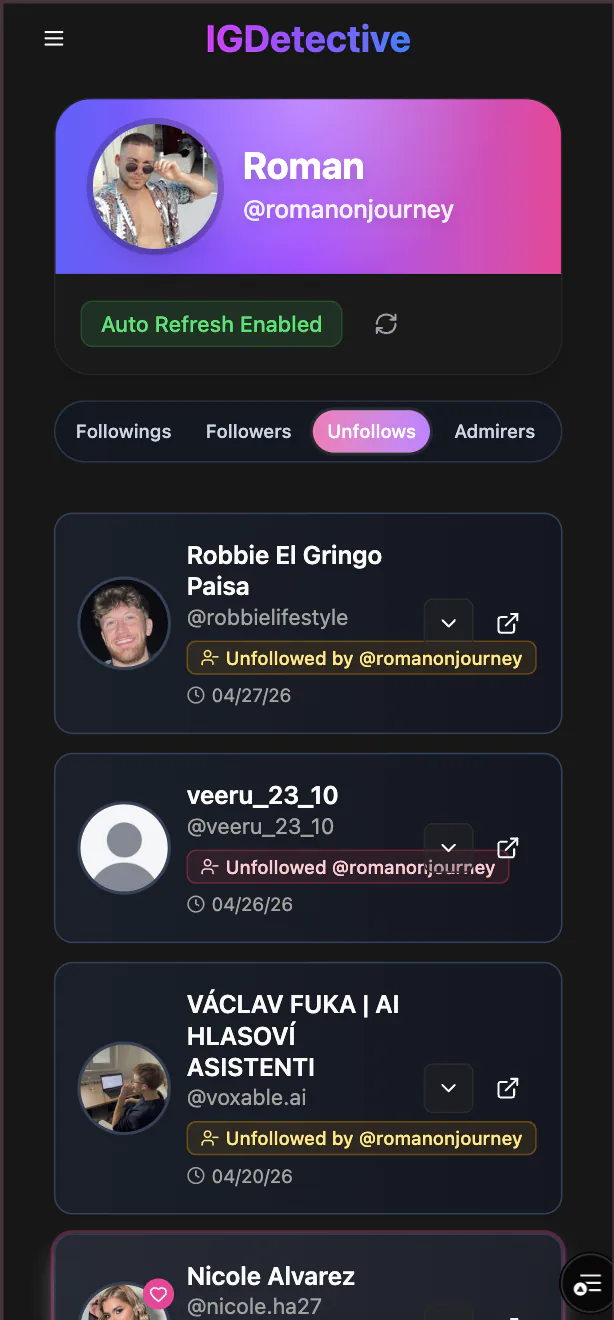
IGDetective tracks unfollows in both directions for any public account from the day you start tracking, refreshed daily, and every unfollow is verified before it is shown.
Trusted by 85,000+ users · Public accounts only
In short
- ·Who unfollowed them and who they unfollowed
- ·Verified, then dated by day
- ·Refreshed daily, up to 5 profiles
- ·No Instagram login or password
How the Instagram unfollow tracker works
Three steps from a username to a dated list of unfollows. No Instagram login.
- 1
Enter the public username
Type the handle, with or without the @, into the box at the top of the page. Any public Instagram account works.
- 2
See what we can show you
Your free result shows what IGDetective can reveal for that account today: unfollows, recent follows, recent followers, Story Archive, posts, likes and comments. Your Instagram account is never connected and they are never notified.
- 3
See who unfollowed
Unfollows in both directions show up verified and dated by day, along with recent follows and recent followers, refreshed daily, with Gossip Chat AI to ask what changed.
How to see who unfollowed you on Instagram
Compare your current followers list against an older copy, such as a screenshot from a few weeks back, and note who is missing. Or open Settings → Accounts Center → Your information and permissions → Download your information (some app versions still show ☰ → Your activity → Download your information). Pick your Instagram profile, choose "Some of your information," tick "Followers and following," select JSON and "All time," then create the export.
The ZIP contains connections/followers_and_following/followers_1.json (everyone who follows you) and following.json; compare two exports taken days apart: anyone in the older one missing from the newer one unfollowed you in between. (recently_unfollowed_profiles.json in that folder lists accounts you unfollowed, not people who unfollowed you.) Or track your own account here and the unfollows from then on show up in your dashboard, each verified and dated by day.
What the unfollow tracker shows
Free check
Type any public username and see what IGDetective can reveal for it. Free, no Instagram login, and the account is never notified.
Unfollows, dated by day
Who unfollowed the account and who it unfollowed, each verified before it is shown and dated by day.
Recent follows and followers
New follows and new followers, each dated by day, refreshed daily and on demand.
What you can see
What we can show you
- ·Who unfollowed a public account and who it unfollowed, each verified and dated by day
- ·What IGDetective can reveal for any public account, free
- ·Recent follows and recent followers, each dated by day
The public/private boundary is Instagram's own: on a public profile the follower list is visible to anyone, on a private one only to approved followers (see Instagram's help page on public and private accounts). Instagram has never added an unfollow notification, as How-To Geek confirms (accessed August 27, 2026). IGDetective uses only publicly available data. Profile owners who would rather not be tracked at all can request removal.
Instagram unfollows: common questions
What changed on September 9 and what still works is in our dated update: Can You Still Track Someone’s New Follows on Instagram in 2026?
How does the Instagram unfollow tracker work?
IGDetective tracks unfollows in both directions for any public account: who unfollowed the account and who the account unfollowed. Every unfollow is verified before it is shown and dated by day. Tracked accounts refresh automatically every day, and you can refresh on demand.
Can it show who unfollowed an account before I started tracking?
No. Instagram keeps no unfollow record, so tracking starts the day you add the account. The sooner you add it, the more you catch.
How can I see who unfollowed me on Instagram?
Instagram does not notify you. Compare your followers list against an older screenshot or your Download Your Information export, or track your own account here and the unfollows from then on show up in your dashboard, each verified and dated by day.
How do you know who stopped following you on Instagram?
Track the account here. IGDetective shows who stopped following, refreshed daily, and lists only unfollows it has verified.
Does Instagram tell you when someone unfollows you?
No. Unfollows are silent; the only visible sign is a lower follower count.
Can I see who doesn’t follow me back?
Instagram does not show this list. Compare your Following list with your Followers list by hand, or download your information and compare the two files.
Do I need to log in to Instagram or give a password?
No. IGDetective never asks for your Instagram login or password, and the account you track is never notified.
Does this work for private accounts?
No. Public accounts only. Instagram shows a private account’s follower list only to its approved followers. IGDetective never sees direct messages, and it shows who unfollowed, not why.
How often are unfollows checked?
Tracked accounts are checked daily, and you can refresh on demand. Every unfollow is verified before it is shown and dated the day it was found.
Related tools and guides
Instagram Follower Viewer
See what IGDetective can reveal for any public account: recent follows, recent followers and unfollows, dated by day.
Instagram Story Viewer
Watch any public account's Stories anonymously, and your name never appears in the viewer list.
RecentFollow review
Our hands-on review of the RecentFollow app, with a dated status timeline.
Best Instagram Tracker 2026
Compare the leading tracking tools across refresh cadence, anonymity, free tier, and AI features.
Instagram following list order
How Instagram sorts following lists on your own profile and on other people’s, and what changed on September 9, 2026.
Maintained by Steven Duncan, founder of IGDetective · Updated · What we track and never see
Check an account, then track it
Start tracking today and catch every unfollow from here on. Verified, dated by day, no Instagram password, ever.
Sign up free